


Solutions


Device management
Remotely manage, and protect laptops and mobile devices.

Orchestration
Automate tasks across devices, from app installs to scripts.

Software management
Inventory, patch, and manage installed software.

Infrastructure as code
See every change, undo any error, repeat every success.

Deployment
Run Fleet the way that fits your team.

Extend Fleet
Integrate your favorite tools with Fleet.
Customers
Pricing
More


Device management
Remotely manage, and protect laptops and mobile devices.
Orchestration
Automate tasks across devices, from app installs to scripts.
Software management
Inventory, patch, and manage installed software.
Infrastructure as code
See every change, undo any error, repeat every success.
Deployment
Run Fleet the way that fits your team.
Extend Fleet
Integrate your favorite tools with Fleet.
Choose how to deploy fleet
Flexible deployment options
Run Fleet the way that fits your team. Every deployment option includes the same features. The difference is who manages the infrastructure and where it runs.
Fleet-managed (SAAS)
Let us host and operate your Fleet instance.
Get the full Fleet feature set, automatic updates, and a production-ready environment from day one, without managing infrastructure yourself.
Avoid managing infrastructure
Get started in minutes
Offload operations to Fleet

Customer-managed (Self-hosted)
Run Fleet on your own servers or virtual machines
Use your existing data center or private infrastructure. You control hardware, data storage, network boundaries, and upgrade cadence, with the same Fleet features.
Keep data inside your physical environment
Use existing data center infrastructure
Avoid public cloud services
Customer-managed (Self-hosted)
Deploy Fleet in your own cloud environment
Run Fleet in a cloud-agnostic environment, using virtual machines or container-native platforms. You control networking, data location, scaling, and upgrade timing.
Control data location and network boundaries
Run Fleet inside an existing cloud environment
Integrate with GitOps or infrastructure-as-code workflows
Customer-managed (Self-hosted)
Run Fleet in disconnected or restricted environments
Use local infrastructure with tightly controlled network egress. Distribute software updates, packages, and policies through approved internal channels, while Fleet provides the same core functionality as other deployment models.
Operate without public internet connectivity
Enforce strict control over network egress
Support isolated or high-security environments
Architecture overview
Run Fleet as a single instance or as a highly available deployment.
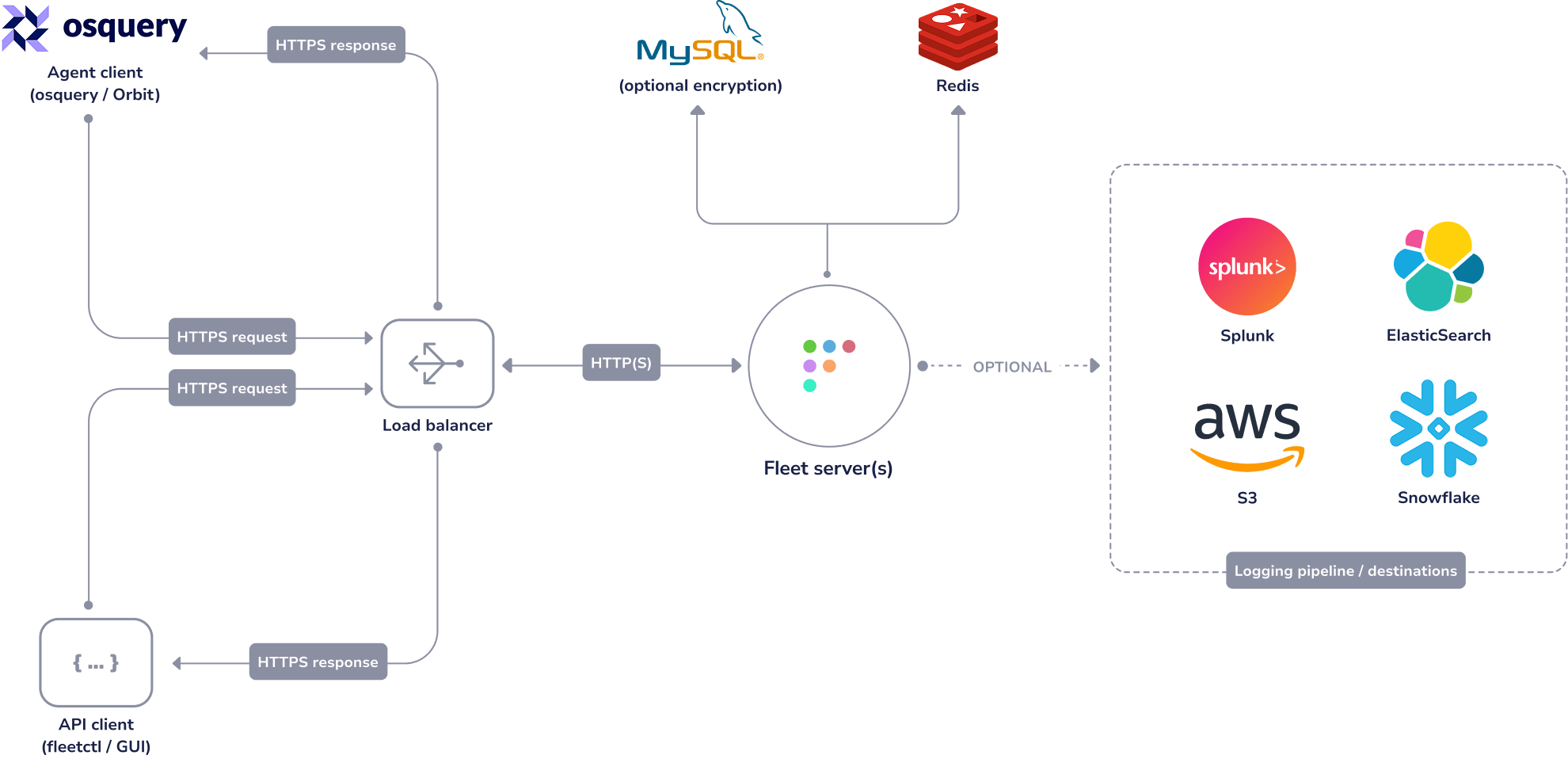
Scale and availability
Scale Fleet to match your environment, from single instance to highly available.
Start with a single instance for small fleets.
Scale horizontally as your fleet grows.
Design high availability through your own infrastructure choices.
Fits into your existing stack
Fit Fleet into your existing stack. Export data, trigger workflows, and connect to downstream systems without changing how Fleet is deployed.
Send data to logging and SIEM platforms
Stream data to pipelines and warehouses
Trigger tickets and alerts
Build custom workflows using the API
Compare deployment models
Managed cloud (Saas)
Best for teams that want Fleet up and running with minimal infrastructure overhead.
Fleet manages infrastructure
Fastest way to get started
Lowest operational overhead
Self-hosted (cloud, on-prem, air-gapped)
Best for teams that need full control over infrastructure, data location, or network boundaries.
You manage infrastructure
Maximum control over data location
Fits existing cloud or on-prem environments
 SOC2 Type 2


